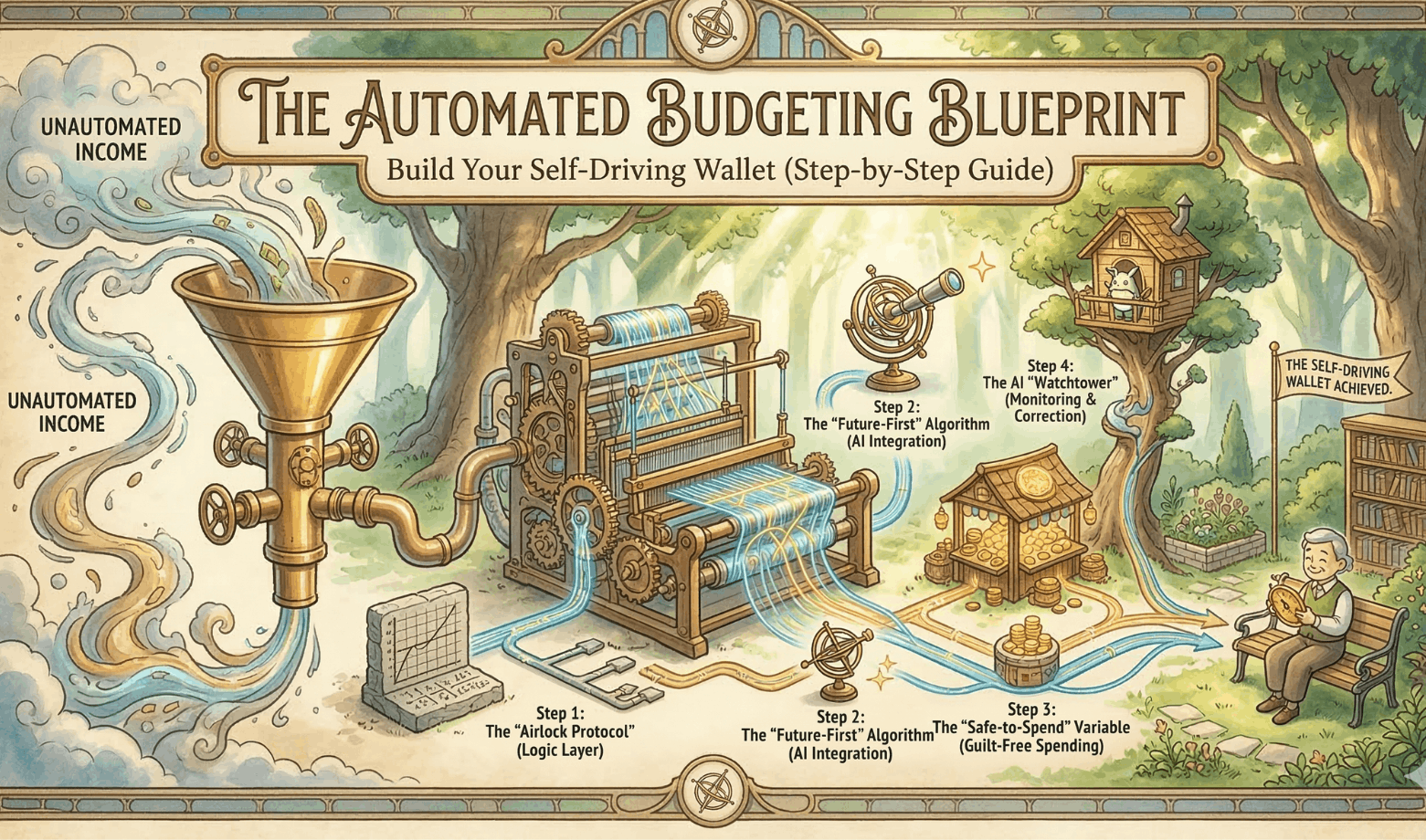
The Automated Budgeting Blueprint: Build Your Self-Driving Wallet (A 4 Step-by-Step Guide)
I used to treat my personal finances like a diet. I thought if I just had enough discipline to track every single latte in a spreadsheet, I would finally have control over my finances.
I was wrong. And if you are reading this, you probably are too.
The problem isn’t you. The problem is that human beings are terrible at making hundreds of small, logical decisions every day. We suffer from “decision fatigue.” By 5:00 PM, your brain is tired. It doesn’t want to calculate if you can afford takeout; it just wants pizza.
Trying to save money by using willpower is like trying to hold your breath underwater to stay dry. Eventually, you have to gasp for air, and that’s when the impulse spending happens.
Now, let’s shift from willpower to financial logistics.
I’m not here to tell you to change your habits. I don’t want you to feel guilty about the pizza. Instead, we are going to build an infrastructure that manages your money for you. I’m talking about automated budgeting.
I call this the Self-Driving Wallet.
This isn’t about restriction. It is about flow. We are going to set up a system where your income hits your bank, pays your bills, funds your investments, and leaves you with “safe-to-spend” cash before you even wake up on payday.
At the core of this system is a method I developed called “The Airlock Protocol.” It creates a literal barrier between your bill money and your fun money. Once you turn this system on, you never have to “budget” again. You just spend what is left, guilt-free.
The Architecture: Anatomy of a Self-Driving Wallet
Most people have one checking account. Their salary goes in, their rent goes out, and they buy groceries from the same pile of cash. This is dangerous. It forces you to constantly do math in your head every time you swipe your card.
If you are looking at a $2,000 balance but $1,500 is needed for rent next week, you don’t actually have $2,000. You have $500. But your brain sees the big number and feels rich.
To fix this, I treat my bank accounts like distinct software modules. We aren’t just organizing money; we are creating a flow of data. Here is the hardware setup you need to open before we can program the automation.
The 4-Module Setup
You need to set up these distinct “buckets.” They can be at the same bank, but they must be separate accounts.
- 1. The Intake Hub (Checking Account A). This is the landing pad. Every dollar you earn from your salary, side hustles, or tax returns hits this account first.
- The Rule: Do not carry a debit card for this account. You should never spend directly from here. It is just a sorting station.
- 2. The Airlock (Checking Account B) This is the boring account. Its only job is to pay bills. Rent, electricity, internet, and insurance come out of here.
- The Rule: This account should always have exactly enough money to cover your fixed costs, plus a small buffer.
- 3. The Vault (High-Yield Savings / Investment) This is where your wealth lives. This includes your Emergency Fund and your long-term investments.
- The Rule: Money flows in, but it rarely flows out. This is a one-way street.
- 4. The Spend Module (Checking C / Cash / Credit) This is the only money you are allowed to see. This account is linked to the debit card in your wallet or your Apple Pay.
- The Rule: If the card doesn’t decline, you can buy it. You don’t need to check your budget, since the “adult” bills are already handled in Airlock.
Step 1: The “Airlock Protocol” (The Logic Layer)

The reason most budgets fail is simple: your Rent money is sitting right next to your Sushi money. When you look at your balance, they look the same.
The Airlock Protocol fixes this by physically moving the funds required for survival into a separate account that cannot be accessed. It creates a structural barrier to overspending.
Here is how to program this logic:
1. Calculate Your “Fixed Burn Rate”
Sit down for ten minutes and list every single bill that stays the same (or close to it) every month.
- Rent/Mortgage
- Utilities (Electricity, Water, Internet)
- Insurance premiums
- Minimum debt payments
- Subscriptions (Netflix, Gym, Spotify)
Add these up. Let’s say the total is $2,000. This is your Burn Rate.
2. The Automatic Transfer (The 5% Buffer)
This is the most critical step. You need to set up a recurring, automatic transfer from your Intake Hub to your Airlock account.
Do not transfer exactly $2,000. Transfer $2,100.
Why the extra $100? That is your 5% buffer. Utilities fluctuate. Sometimes the electric bill is higher in the summer. This buffer prevents overdrafts without you having to check the account.
- Timing: Schedule this transfer to happen 24 hours after your typical payday. If you get paid on the 1st, the transfer happens on the 2nd. This ensures the cash has cleared before the system moves it.
3. Point the Lasers
Now, log in to every service provider (your landlord portal, electric company, credit card issuer) and change the “Autopay” settings. Link them all to the Airlock account number.
(How to automate bill payments)
The Result: Your bills are now paid by a ghost. You never see the money, so you never feel the “pain” of paying them, and you never accidentally spend that money at the bar.
Step 2: The “Future-First” Algorithm (AI Integration)

Traditional financial gurus love to shout, “Pay yourself first!”
I disagree. You should pay your landlord first. Eviction is harder to deal with than a low savings balance. That is why the Airlock (Section 3) always gets priority.
But once your survival is funded, you must pay your future self second.
If you wait until the end of the month to save “whatever is left,” you will save zero dollars. Parkinson’s Law states that work expands to fill the time available. Well, spending expands to fill the bank balance available.
To beat this, we automate the extraction of wealth the same way we automated the bills.
The Calculation: How Much Can I Actually Save?
Most people guess their savings rate. They pick a round number like “$200” because it sounds nice.
We are going to use AI to find the real number. We want a number that is aggressive enough to build wealth, but not so high that you have to steal money back from your savings account (which breaks the system).
Use this prompt in ChatGPT, Claude, or Gemini to calculate your ideal number.
Copy This Prompt: The Savings Calculator
“Act as a financial analyst. I want to determine a realistic monthly savings contribution. Here is my data:
- Total Monthly Net Income: $[Insert Amount]
- Total Fixed Expenses (My Airlock number): $[Insert Amount]
- Estimated Flexible Spending (Groceries/Fun): $[Insert Amount]
- Financial Goal: [e.g., Save $10k in 12 months]
Please calculate: A) The exact monthly savings required to hit my goal. B) What percentage of my remaining income (after fixed expenses) this represents. C) If this goal is realistic given my income, or if I need to adjust the timeline.”
The Execution: Set It and Forget It
Once the AI gives you the number, let’s say it’s $400, you set up Automated Transfer #2.
- From: Intake Hub
- To: The Vault (Your High-Yield Savings or Robo-Advisor)
- When: The same day as your Airlock transfer (24 hours after payday).
Now, your paycheck hits, and instantly, two chunks are bitten out of it: one for your bills, and one for your future. You haven’t lifted a finger, and you are already responsible!
Step 3: The “Safe-to-Spend” Variable (Guilt-Free Spending)

This is the part where the system becomes fun.
Most budgeting advice feels like a punishment. It tells you what you can’t do. “Don’t buy the coffee.” “Don’t eat out.” It creates a scarcity mindset that makes you miserable.
The Self-Driving Wallet does the opposite. Because we have already secured your housing and your retirement in the first 24 hours after payday, whatever is left over is yours. Completely.
The Math
Here is the simple equation to find your number:
Total Income − (Airlock Transfer + Vault Transfer) = Safe-to-Spend
The Deployment
This is the final automated transfer in the chain.
You set up a transfer for the remainder of your paycheck to go to your Spend Module (Checking Account C). This is the account linked to your debit card.
Alternatively, many people use a “neobank” app like Revolut, Monzo, or Chime for this. These apps are great because they send you instant notifications: “You spent $12 at Starbucks. You have $140 left for the week.”
The Psychology: Permission to “Burn It”
This is the hardest part for people to accept, but it is the most liberating.
If the money is in this account, you can burn it.
You do not need to track it. You do not need to categorize it. If you want to blow the entire weekly balance on a fancy dinner on Tuesday and eat ramen for the rest of the week, you can. You won’t miss rent. You won’t miss your savings goal.
You have permission to enjoy your life because you have built a system that handles your responsibilities first.
Step 4: The AI “Watchtower” (Monitoring & Correction)

There is one danger to the Self-Driving Wallet: complacency.
When you automate everything, you stop logging into your bank accounts. While this is great for your mental health, it can be bad for security. If a fraudulent charge hits your account, or if Netflix quietly raises their price by $5, you might not notice for months.
You need a Watchtower.
We don’t want to go back to manual tracking (that defeats the purpose). Instead, we use “Passive Monitoring.” We hire a robot to watch the money for us.
The Tools
You need a financial aggregator that supports custom alerts. Apps like Rocket Money, Monarch Money, or Copilot are excellent for this. Connect all your modules (Intake, Airlock, Vault, Spend) to one of these apps.
Setting the “Tripwires”
Do not use these apps to budget. Use them to set up an alarm system. Configure the following three alerts:
- 1. The “Whale” Alert (Transaction > $500): If a large amount of money leaves any account, you want to know immediately. This catches fraud or accidental double-payments.
- 2. The “Creep” Alert (Subscription Monitor): AI aggregators are great at spotting recurring charges. They will alert you if a recurring bill changes amount (e.g., your insurance premium went up $20).
- 3. The “Low Fuel” Warning: Set an alert if your Airlock (Bill Account) drops below $100. This is your “Check Engine” light. It means your buffer is gone, and you are at risk of an overdraft.
By setting these tripwires, you can safely ignore your finances 99% of the time, knowing that your Watchtower will tap you on the shoulder if something goes wrong.
Advanced: Scripting Your Money (No-Code Automation)

This section is for the nerds (like me).
Most bank apps are rigid. They let you schedule transfers by time (e.g., “every Monday”), but not by behavior.
To get around this, we can use “bridge” software like IFTTT (If This, Then That) or Zapier. These tools act as universal translators, letting your bank communicate with other apps on your phone. This allows you to “script” your savings based on how you live your life.
The Logic: “If This, Then That”
The formula is simple: Trigger + Action = Rule.
Here are the two most powerful scripts I use to gamify my savings:
Script 1: The “Guilt Tax” (Behavioral Trigger)
I have a weakness for expensive sushi. Instead of banning it, I tax it.
- The Trigger: “New transaction at Souper Happy.” (favorite sushi spot)
- The Action: “Transfer $5 from Spend Module to Vault.”
- The Result: My $15 sushi roll now costs me $20. $15 goes to the store, and $5 goes to my future self. It hurts just enough to make me think twice, but if I do buy it, I’m also saving money.
Script 2: The “Market Sniper” (Data Trigger)
I want to buy stocks when they are “on sale,” but I can’t watch the market 24/7.
- The Trigger: “S&P 500 drops by 2% in a single day.”
- The Action: “Transfer $100 to Brokerage Account.”
- The Result: I automatically buy the dip without checking the news.
The Maintenance Schedule: The “CFO Meeting”

We built this system so you could stop obsessing over money. You should not be checking your accounts every day.
However, you cannot ignore them forever. You are the CEO of your life, but once a month, you need to put on your “CFO Hat” (Chief Financial Officer).
I do this on the 1st of every month. It takes exactly 30 minutes. If it takes longer than that, you are getting too bogged down in the details.
The 3-Point Checklist
- 1. Check the Airlock Buffer Log into your Bill Account (Airlock). Is the balance slowly growing, or is it shrinking?
- If it’s growing: Great. Your buffer is safe.
- If it’s shrinking: Your fixed expenses have gone up (maybe the electric bill spiked), and your automated transfer isn’t covering it anymore. Increase the transfer from the Intake Hub immediately.
- 2. Scan for Leakage Scroll through the transactions. Did you sign up for Peacock to watch one show and forget to cancel it? Kill those zombies now.
- 3. Updates and Patches Did you get a raise? If your income went up, do not just let that extra money sit in your spending account. You will spend it on nonsense.
- The Move: If you got a $200/month raise, increase your Vault (Investment) transfer by $150. Enjoy the other $50.
The AI Audit: Catching “Lifestyle Creep”
Lifestyle creep is the silent killer of wealth. It’s when your spending rises just as fast as your income. It is hard to see with the naked eye, but AI spots it instantly.
Download your last 3 months of transactions as a CSV file (most banks let you do this with one click). Then, paste the data into ChatGPT or Claude with this prompt.
Copy This Prompt: The Monthly Audit
“I am providing my transaction data for the last 3 months. Please analyze it for ‘Lifestyle Creep.’
- Group my spending by category (e.g., Dining, Groceries, Transport).
- Compare the total spend for each category month-over-month.
- Highlight any category that has increased by more than 10% consecutively.
- Identify any recurring payments that appear new in the last 30 days.”
This prompt gives you a brutal, unbiased report on where your money is actually going.
Wrapping Up
This setup does take some work, and you may need to open a few accounts to get things started, but it’s worth it if you really want to automate your budgeting. You may hit some roadblocks along the way while setting up, but that’s how you learn and grow. Once you automate your budgeting, you just need to check in once or twice a week to make sure everything is running smoothly. Have fun setting this up, and thanks for reading!
Frequently Asked Questions (FAQ)
Should I automate my finances if I have credit card debt?
Answer: Yes, but you will change the destination of the Vault transfer. Instead of sending that money to an investment account, program the transfer to go directly to your credit card issuer as an “extra payment” (above the minimum). This applies the “Snowball” or “Avalanche” method automatically, ensuring you pay down debt aggressively without having to think about it.
Can I do this all at one bank?
Answer: Technically, yes, but I don’t recommend it. If your “Bill Money” is visible right next to your “Fun Money” in the same app, it is too tempting to “borrow” from it. The psychological power of the Self-Driving Wallet comes from friction. By keeping your Spend Module at a completely different bank (or neobank) than your Airlock, you add a time delay to transfers that stops impulse spending.
How long does this take to set up?
Answer: Expect to spend about 60 to 90 minutes setting up the accounts and configuring the automatic transfers. Once the infrastructure is built, the ongoing time commitment is roughly 15 minutes per month for your “CFO Meeting.”
Is the “Self-Driving Wallet” safe?
Answer: Yes, automated budgeting is generally safer than manual budgeting because it reduces the risk of human error (like forgetting to pay a bill). However, you must use strong unique passwords and 2-factor authentication (2FA) on all your bank accounts. Additionally, using an “AI Watchtower” tool ensures you are alerted immediately if suspicious activity occurs.